This is a quick how to which will enable you to remove any disconnected mailboxes from exchange 2010, since the purge mailbox feature is no longer available. (Source: spiceworks).
Monday, November 23, 2020


Monday, November 9, 2020
Query Active Directory from Excel
This is and old post from Remko Weijnen with some comde to get information from Active Directory.
I had to lookup some users in Active Directory today which I received by mail. Offcourse I got full users name while I needed either samAccountName or full adsPath. Usually I write a small VBS script to do the lookup and paste this in Excel for further processing. But today I decided that an Excel function to do the lookup would be nice. So I wrote it.
The function is called GetAdsProp and allows you to search on a specific AD field in the whole AD tree and return the value of another field.
Saturday, November 7, 2020
Open Live Writer
This version is able to connect with Google’s blogger.
[OpenLiveWriterSetup.zip](https://github.com/OpenLiveWriter/OpenLiveWriter/files/4027251/OpenLiveWriterSetup.zip)
Friday, January 3, 2020
How to remove the recovery partition
These are the steps to remove the recovery partition in windows, thanks to https://superuser.com/questions/1073883/cant-remove-recovery-partition
- Go to start and type
cmd(this is called command prompt) - In command prompt type
diskpartand hit enter - Type
list diskand hit enter - From the list of disks find the one you want to work with (I believe in your case there is only one so it should be easy)
- Once you find the drive you are looking for type
select disk 'numberofdrive' - Now type
list partitionand find the partition you want to work with - Once you have identified the partition in question type
select partition 'numberofpartition' - Now type
delete partition(WARNING ONCE YOU DO THIS THERE IS NO GOING BACK) and hit enter , if it says "cannot delete a protected partition..." usedelete partition override(Note you will also have to repeat these steps with the partition in front of the recovery partition if you plan on extending the system volume) - Once it is finish type
exitand hit enter
Tuesday, October 22, 2019
Remove vmkdump foder in VMware esxi 6.x
Run the command esxcli system coredump file list until get a true value for both parameters Active and Configured.
[root@esx:~] esxcli system coredump file list
Path Active Configured Size
------------------------------------------------------------------------------------------------------- ------ ---------- ----------
/vmfs/volumes/xxxxxxxx-xxxxxxxx-xxxx-xxxxxxxxxxxx/vmkdump/xxxxxxxx-xxxx-xxxx-xxxx-xxxxxxxxxxxx.dumpfile true true 3740270592
Then run the following two commands to remove de the dump file:
[root@esx:~] esxcli system coredump file set -u
[root@esx:~] esxcli system coredump file remove -f /vmfs/volumes/xxxxxxxx-xxxxxxxx-xxxx-xxxxxxxxxxxx/vmkdump/xxxxxxxx-xxxx-xxxx-xxxx-xxxxxxxxxxxx.dumpfile
Now you can remove the vmkdump folder.
Thursday, October 17, 2019
Set hardware time on VMware esxi 6.x from console
If you need to change the system time for a VMware esxi 6.x server fron CLI you must use the following command:
esxcli system time set
Friday, September 27, 2019
Update VMware ESXi v5.5
Since the updates for ESXi v5.5 are no more accesible at VMware Updates page, here you’ll find a procedure for install then from esxi console.
Thursday, August 8, 2019
Change the nic order on JovianDSS
In JovianDSS it is possible to change the NIC order to suite your needs.
Change vmnic order on vSphere 6.x
This is an article by Marco van Baggun at www.vmbaggum.nl that explains how to change vmnic order on vSphere 6.x
Here you can check how to do it for previous versions.
Monday, July 1, 2019
Enable traffic logs in Fortigate firewalls
Local traffic logs are disabled by default in fortigate firewalls. This logs can be enabled from console.
Check the following:
config log memory filter
get <<—lists all options
Make sure local-traffic logs are enabled. If not then:
set local-traffic enable
end
Enable "Log Allowed Traffic" and select "All Sessions" on the firewall policy.
Make sure you display logs from the correct location(GUI):
"Log & Report >> Log Settings >> GUI Preferences >> Memory/FortiCloud"
Tuesday, June 11, 2019
Install latest Java 8 on raspbian
This is a post by BartB at brodzinski.net that explains how to install latest Java 8 on raspbian.
Tuesday, June 4, 2019
Install ppp package in Raspberry Pi
This is an extract from StackExchange that shows how to install ppp package in Raspberry Pi.
This package is missing dependencies. You need to make sure you update your packages and preferably use a package manager that handles dependencies better. Try this:
pi@raspberrypi:~$ sudo su -
root@raspberrypi:~# apt-get update && apt-get install aptitude
root@raspberrypi:~# aptitude upgrade && dpkg --configure -a && aptitude install ppp
Friday, July 13, 2018
VeraCrypt remembers my password using W10
It appears Windows 10 doesn't do a shutdown in the same sense as Windows 7 did. It does a kind of hybrid shutdown/hybernation to allow super-quick startup. As such, the user isn't really logged off, so VeraCrypt doesn't get alerted to the user's session ending, so doesn't dismount the drive.
I've resolved this issue by adding a task in Task Scheduler (taskschd.msc).
The task must be an umount command ("C:\Program Files\VeraCrypt\VeraCrypt.exe" /d /f /quit ).
And the trigger a registry event:
Registry: System
Source: User32
Event id: 1074
Using this configuration your veracrypt volumes are unmounted even with Fast Startup enabled.
PD: I've tried this solution only with file containers. I don't know if it works with system drives or partitions.
Thursday, July 12, 2018
Sonicwall - Export configuration settings using Enterprise Command Line Interface (E-CLI)
Sonicwall TZ firewalls configuration can be exported from command line to a ftp server. Here you can find the Sonicwall related documentation regarding this subject.
examples:
export current-config cli ftp ftp://username:password@hostname/filename.txt
export current-config exp ftp ftp://username:password@hostname/filename.exp
This is the full Sonicwall article:
Friday, June 22, 2018
How to change the default PST location/path registry in Outlook?
Here you can find a Post from www.extendedoffice.com that explains how to change the default PST and OST files location.
Friday, October 20, 2017
How to Set Up a Logon Script Only for Terminal Server Users
You may want to have a logon script that only runs for a user when he or she connects to a Terminal Server through the Terminal Server client or by the console. Extracted from Microsoft Support, this is the original article.
Thursday, October 19, 2017
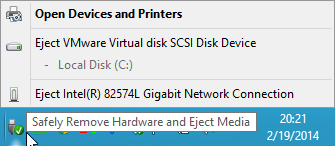
Various ways to address the "Safely Remove Hardware" Tray Icon issue
Here you can find a post by Andreas Peetz that explains how to avoid users to ‘safely remove devices’ in virtual machines.
Various ways to address the "Safely Remove Hardware" Tray Icon issue
by Andreas Peetz at Sunday, February 23, 2014
Thursday, February 23, 2017
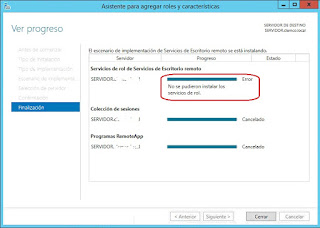
Cómo instalar los servicios de escritorio remoto en un W2012 R2 cuyo Active Directory se ha migrado desde W2003
Después de migrar el Active Directory desde un W2003 a W2012 R2, al intentar instalar el rol de Escritorio Remoto, a veces, se produce un error.

Wednesday, October 5, 2016
How to configure NAT Policies on Soniwall devices
This is the dell’s document for configuring Nat policies on Sonicwall devices: https://support.software.dell.com/kb/sw7979
Title
UTM: SonicOS Enhanced how to configure NAT Policies
Description
UTM: SonicOS Enhanced how to configure NAT Policies
Tuesday, February 2, 2016
Determine Domain and username used to map a network drive
If you need to determine the Username used to map a network drive this
is the command you must use at command prompt:
wmic netuse where LocalName="Z:" get UserName /value
Subscribe to:
Posts (Atom)